Cloud-native GIS platform
A lightweight, cloud-native GIS platform for visualizing, exploring, and analyzing geospatial data.
GeoLibre is built with Tauri, React, TypeScript, MapLibre GL JS, DuckDB-WASM Spatial, and deck.gl. The same workspace runs across desktop and web environments, adapting responsively to mobile screens, with fast local and cloud-native data work, project files, styling, plugins, and modern geospatial workflows.
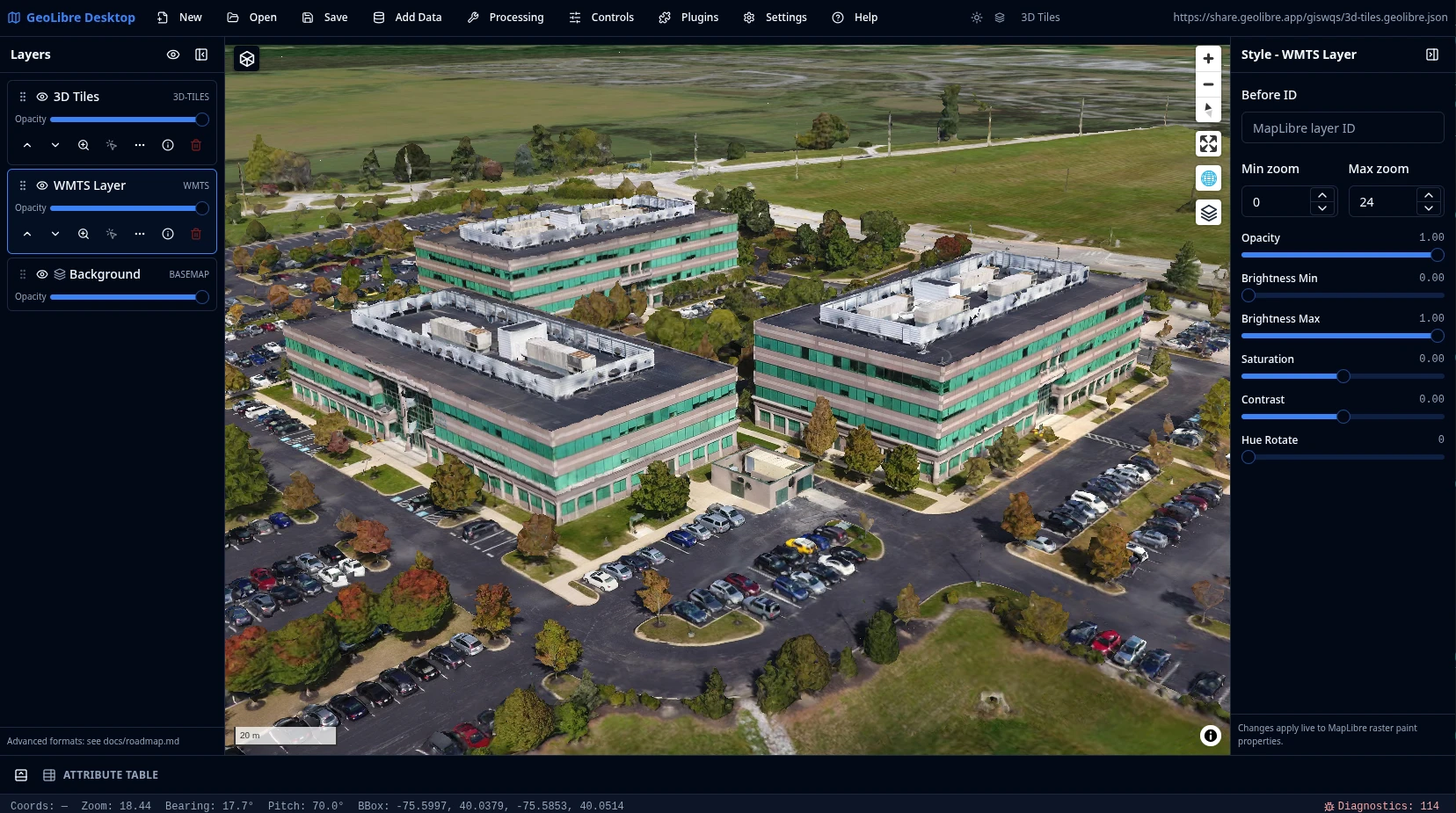
What GeoLibre does today
MapLibre map workspace
Pan, zoom, rotate, and tilt a MapLibre map with OpenFreeMap basemaps or a blank background. Toggle controls for navigation, globe, terrain, geolocation, scale, attribution, and logo, plus on-map tools like Measure, Bookmark, Minimap, View State, and Field Collection for capturing point, line, and polygon observations with a custom form by GPS or map tap.
Local and remote data
Load local and remote vector and raster data, then inspect and edit attributes in a table with a field calculator, charts, statistics, and export to GeoJSON, GeoParquet, Shapefile, GeoPackage, or CSV. Style layers with categorized, graduated, expression, heatmap, and clustering renderers, group and reorder the layer stack with undo/redo, and save or share .geolibre.json projects.
Plugins and marketplace
Activate built-in plugins for layer control, basemaps, MapLibre components, swipe, street view, time slider, Overture Maps, LiDAR, GeoAgent, GeoEditor, and atmosphere effects, and install, update, or remove external plugins from the built-in marketplace.
Advanced layer formats
Add Data covers XYZ, WMS, WFS, WMTS, ArcGIS, and STAC services; GeoParquet, FlatGeobuf, PMTiles, Zarr, and OpenStreetMap PBF; COG, GeoTIFF, Cloud-Optimized NetCDF/HDF, and MBTiles rasters; LiDAR, Gaussian splats, 3D Tiles (including authenticated tilesets), georeferenced video, and deck.gl layers; and DuckDB and PostgreSQL databases.
Conversion and Whitebox
Convert vector and raster data to cloud-native GeoParquet, FlatGeobuf, PMTiles, and COG from the Conversion menu, and run batch geoprocessing with the extensive Whitebox toolbox running on the optional Python sidecar.
SQL Workspace
Run DuckDB Spatial SQL in the browser against loaded layers, local files, and remote URLs, or query with the in-browser PostGIS (PGlite) and Apache Sedona engines. Bare URLs auto-wrap into the matching reader and stream over HTTP range requests. Includes sample queries, query history, and adding results to the map or exporting them as CSV or GeoParquet.
Vector tools
Geometry tools under Processing → Vector — buffer, centroids, convex hull, dissolve, bounding box, simplify, smooth, regular grid, clip, overlay (intersect/difference/union), spatial and attribute joins, selection, Voronoi/Delaunay, and H3 grids and binning — run in the browser with Turf.js, with an optional GeoPandas sidecar engine. A Spatial Statistics toolbox and a batch runner with model/pipeline chaining round out Processing.
Raster tools
Raster tools under Processing → Raster — hillshade, slope, aspect, reproject, resample, clip, polygonize, contour, zonal and focal statistics, raster calculator, reclassify, mosaic, and a Spectral Index toolbox (NDVI, NDWI, EVI with band presets) — run on a rasterio sidecar with a client-side fallback. Includes a Georeferencer and single-band or RGB raster styling.
Python and Jupyter
Embed the full GeoLibre app in a Jupyter notebook with the geolibre Python package, driving the map through an expanded leafmap-style API that syncs both ways so UI edits read back from Python. An in-app Python Console scripts the app, and a docked Notebook panel runs Jupyter beside the map — JupyterLite on the web, a JupyterLab server on desktop.
AI Assistant
Chat with your data: a natural-language assistant that turns plain-English requests into GeoLibre operations — Spatial SQL, symbology, add or remove data, and map control — applied through the app so they stay auditable and undoable. Provider-pluggable (Google Gemini, Anthropic, OpenAI) with your own API key, disabled until configured.
Collaboration and story maps
Edit the same project with others in real time (collaboration MVP; requires VITE_GEOLIBRE_COLLAB_URL), and build scroll-driven story maps with a presenter view and a standalone HTML export you can publish anywhere.
Learn GeoLibre
New to GeoLibre? Start with the User Guide for a feature-by-feature tour of the workspace, menus, panels, and tools, then follow the Tutorials for hands-on, end-to-end workflows.
- Interface Overview: the toolbar, panels, map, and status bar.
- Adding Data: every file, web service, cloud, 3D, and database source.
- Processing Tools and SQL Workspace: analysis with vector, raster, conversion, Whitebox, and DuckDB Spatial SQL.
- AI Assistant: chat with your data — natural language to SQL, symbology, and map control.
- Plugins & Marketplace: activate built-ins and install from the registry.
- Your First Map: add a layer, style it, inspect it, and share it.
Read the User Guide Browse the Tutorials
Try it in the browser
The live demo is the browser-capable version of the GeoLibre desktop UI. It is useful for exploring the map, loading browser-selected vector data supported by DuckDB-WASM Spatial, adding URL-based layers, styling layers, and testing plugins. Desktop-only file dialogs, local MBTiles, local raster reads, and filesystem save/open operations still require the installed Tauri app.
Hosted on GitHub Pages, private by design
The live demo is a static site deployed on GitHub Pages and runs entirely in your browser. It has no analytics and no server account, and the data you load is processed client-side in your browser session. Data leaves your browser only when you choose to add a remote URL or explicitly share a project.
Open a project by passing a public .geolibre.json URL with the url query parameter:
https://viewer.geolibre.app/?url=https://share.geolibre.app/giswqs/3d-tiles.geolibre.json
For narrow embeds, add ?layout=compact to the demo URL to use icon-only toolbar buttons and hide project metadata:
https://viewer.geolibre.app/?url=https://share.geolibre.app/giswqs/3d-tiles.geolibre.json&layout=compact
For map-focused embeds, add &panels=none to hide the Layers, Style, and Attribute table panels:
https://viewer.geolibre.app/?url=https://share.geolibre.app/giswqs/3d-tiles.geolibre.json&layout=compact&panels=none
Use toolbar=icons when you only want icon-only toolbar buttons. panels=hidden, panels=hide, panels=off, and hidePanels=true are accepted aliases for hiding panels.
For a fully chrome-free, map-only embed, add &maponly to hide the toolbar menu, all panels, and the status bar:
https://viewer.geolibre.app/?url=https://share.geolibre.app/giswqs/3d-tiles.geolibre.json&maponly
Other parameters control the toolbar, panels, and theme. See Embedding & Sharing for the full parameter reference and <iframe> examples.
Open the live demo Embedding & Sharing
Project status
GeoLibre 1.4 is a stable release. It includes the map workspace, the .geolibre.json project format with Save, Open, and Share, the plugin API, and the plugin marketplace for installing, updating, and removing external plugins. Data support spans browser vector import, DuckDB-WASM Spatial loading, the full Add Data surface (files, web services, cloud formats, 3D layers, and databases), and cloud integrations through the Planetary Computer and Earth Engine panels, the Overture Maps plugin, and the federal Web Services plugins. Processing covers the vector tools (Turf.js with an optional GeoPandas sidecar), the raster tools (rasterio sidecar with a client-side fallback), a Spectral Index toolbox, a Raster Georeferencer, a Spatial Statistics toolbox, network analysis (isochrones, service areas, OD cost matrices), the Conversion menu (GeoParquet, FlatGeobuf, PMTiles, COG), the Whitebox toolbox, AI Segmentation via SamGeo/SAM 3, and the SQL Workspace for DuckDB Spatial SQL (with PGlite PostGIS and Apache Sedona engines). The release also ships a docked Notebook panel that runs Jupyter beside the map (JupyterLite on the web, a desktop JupyterLab server), a Field Collection tool for capturing point, line, and polygon observations, real-time multi-user collaboration, a scroll-driven story map builder, a natural-language AI assistant and in-app Python Console, multi-provider geocoding, the Time Slider plugin, a Controls menu (Measure, Bookmark, Minimap, View State), a Print menu, Layout settings, runtime environment variables, diagnostics, embed-friendly URL parameters including the maponly mode, cross-platform installers (including a macOS Homebrew Cask), and Docker support for the browser app. GeoLibre also ships as a native Android app built from the same codebase via Tauri v2 mobile (see Android), with a responsive touch layout for phones, and offline improvements (a Download Offline Area tool plus service-worker caching of the CDN-loaded Pyodide and PGlite/PostGIS engines). See the roadmap for the full release history and what comes next.